SMS Terms and Consent
GoDealPro SMS messaging program — last updated May 13, 2026
1. Program Operator
The SMS program described on this page is operated by GoDealPro(GoDealPro LLC, the "Platform"), an off-market real estate marketplace connecting sellers and investor-buyers across the United States.
2. Message Types
Users who opt in may receive one or more of the following SMS message categories:
- Phone verification codes. One-time codes sent when a user adds or updates a phone number. User-initiated; not part of a recurring program.
- Buy Box match alerts.Notifications when a newly-published property listing matches a buyer's saved Buy Box criteria (saved investment preferences). Available to Business-tier subscribers who explicitly opt in to SMS notifications.
- Account activity notifications. Transactional alerts such as offers received on a user's own listings, offer status changes, new direct messages, and listing-related activity. Available to Business-tier subscribers who explicitly opt in.
- Account moderation notices.Notifications about platform-required actions on a user's account or listings (suspension, badge changes, dispute updates). Sent only to users who have opted in to SMS.
GoDealPro does not send marketing blasts, promotional offers, third-party advertisements, or affiliate content via SMS. Phone numbers are never sold or shared with third parties for marketing.
3. Message Frequency
Message frequency varies based on the user's subscription tier, account activity, and saved Buy Box criteria. A typical opted-in user receives between 0 and 10 messages per week. Users with broadly-configured Buy Box criteria may receive more during periods of high marketplace inventory.
4. Message and Data Rates
Message and data rates may apply. GoDealPro does not charge for SMS messages, but your mobile carrier may charge standard message and data rates based on your service plan. Contact your carrier for details.
5. How Users Opt In
SMS consent on GoDealPro is explicit and double-opt-in. No user receives recurring SMS without taking two affirmative actions:
- Account creation and phone verification. During account setup or via Settings > Profile > Add/Verify Phone, the user enters their phone number and receives a one-time verification code by SMS. The verification step displays the following consent text inline:
"By requesting a code, you consent to receive a one-time SMS verification message. Standard message and data rates may apply."
This step only authorizes the one-time verification code, not the recurring program.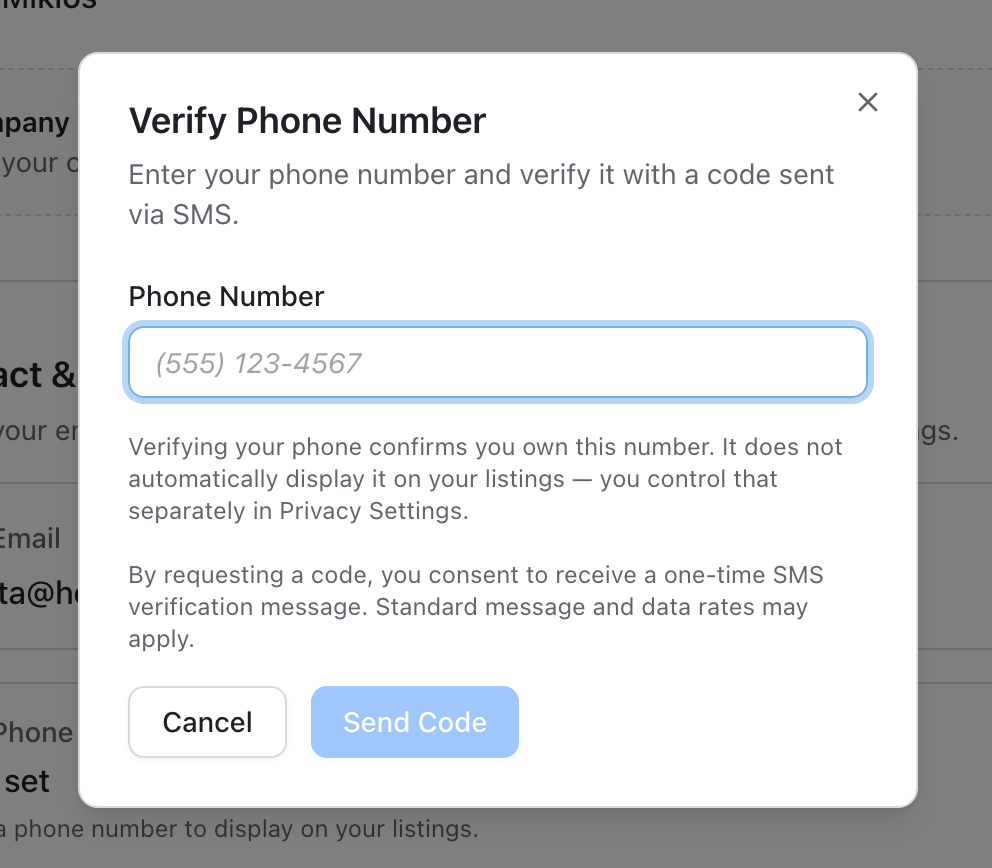
Figure 1 — Phone verification dialog (Settings > Profile). The consent line and rate disclosure are shown inline at the point of action, before any SMS is sent. - Notification preferences page. After phone verification, the user opts in to recurring SMS via Settings > Notifications. The page is grouped by channel — In-App, Email, SMS, and Account & Security — so each channel has its own state and controls. The SMS section is gated to Business-tier subscribers and only displays per-category toggles after consent has been captured. All per-category SMS toggles default to OFF even after consent — users must affirmatively enable each category they wish to receive.
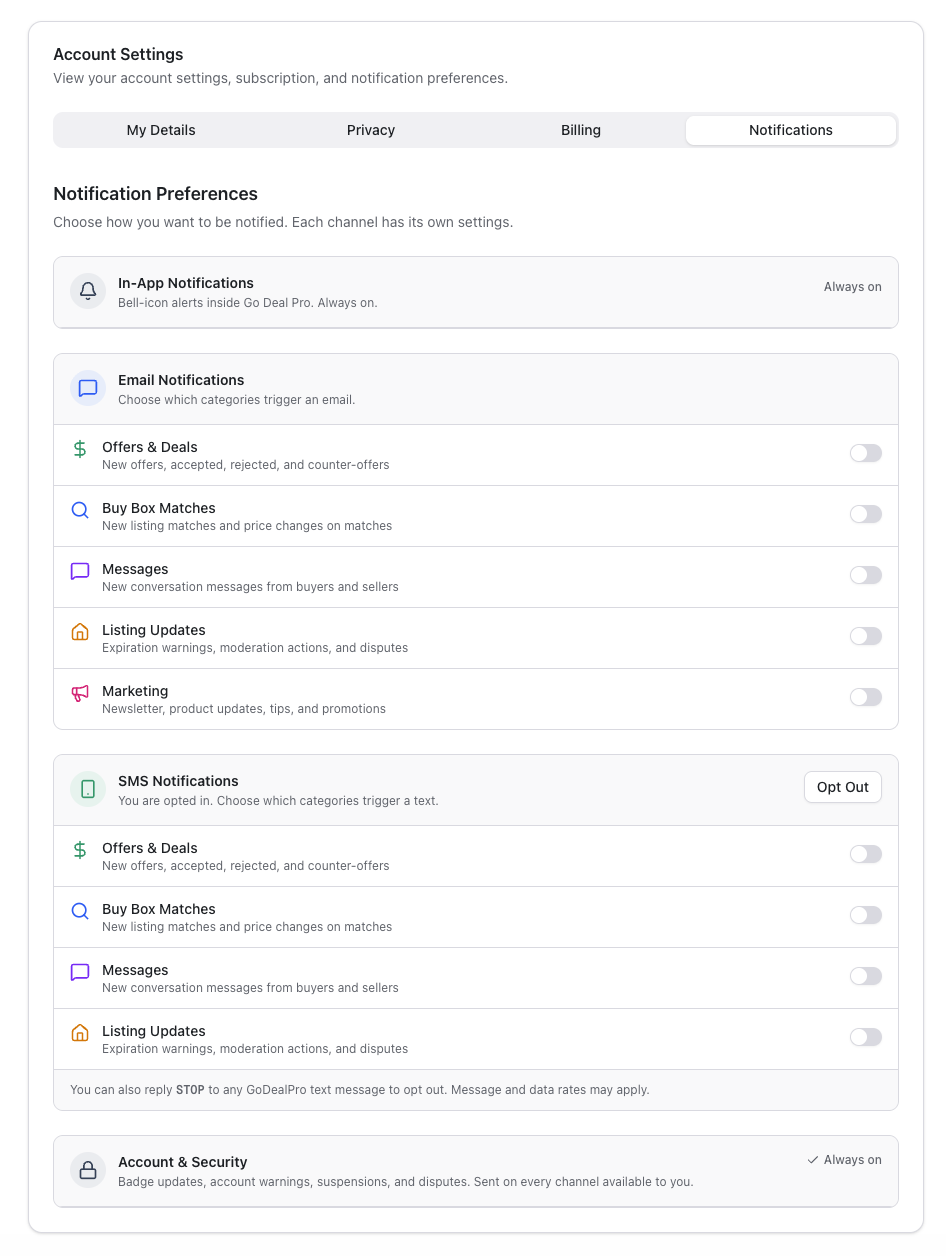
Figure 2 — Settings > Notifications, channel-grouped layout. The SMS Notifications section is shown in its opted-in state with all four per-category toggles (Offers & Deals, Buy Box Matches, Messages, Listing Updates) defaulting to OFF. Users must explicitly enable each category to receive that type of message. An Opt Outbutton revokes consent in one click, and an inline reminder documents the STOP keyword. SMS has no Marketing category — confirming GoDealPro never sends marketing SMS. Account & Security notifications fire on every channel available to the account. - Affirmative consent disclosure. The first time a user enables any SMS toggle, a consent dialog appears displaying the full required disclosures inline: program identification, message types, message frequency, rate disclosure, STOP / HELP keyword behavior, and links to Privacy Policy and Terms. The user must click "Enable SMS" to confirm — clicking Cancel or dismissing the dialog leaves SMS disabled. SMS is never sent until this consent is captured.
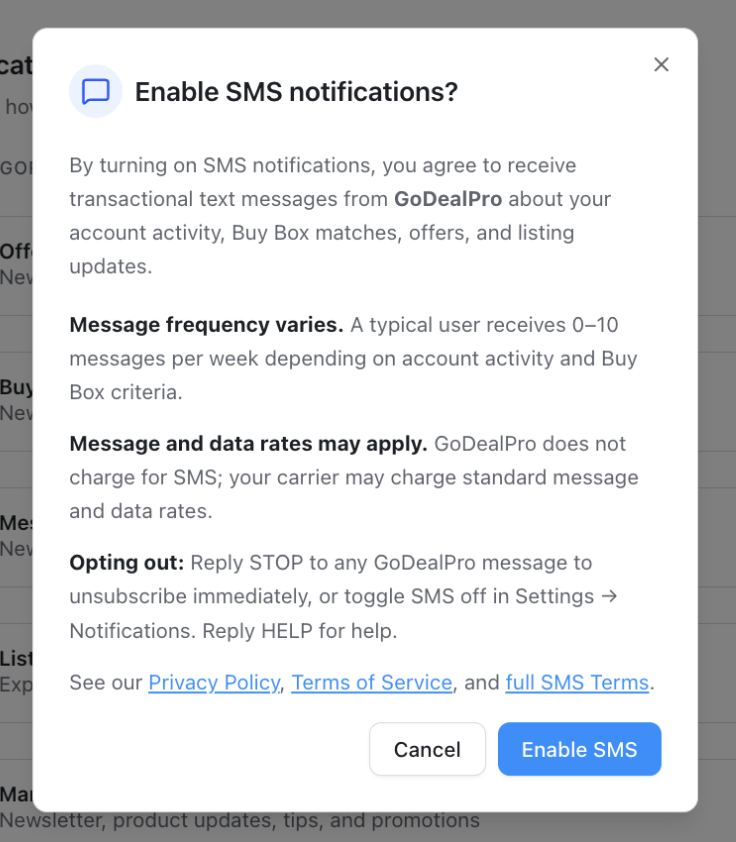
Figure 3 — Affirmative consent dialog displayed at the moment of recurring opt-in. All CTIA-required disclosures (frequency, rate disclosure, STOP/HELP behavior, links to Privacy Policy, Terms of Service, and full SMS Terms) appear inline. The user must explicitly click "Enable SMS" to confirm consent — the default action is Cancel.
Users may also receive a confirmation SMS the first time SMS notifications are enabled, including STOP and HELP instructions (see Section 6).
6. How Users Opt Out — STOP and HELP
Users can opt out of SMS notifications at any time using either method:
- Reply STOP to any SMS message from GoDealPro to immediately unsubscribe from all recurring SMS. Users receive a single confirmation message acknowledging the opt-out.
- Toggle SMS off in Settings > Notifications.
Users can also reply HELP to any SMS message to receive contact information for GoDealPro support:
"GoDealPro: For help, email hello@godealpro.com or visit godealpro.com/sms-terms. Reply STOP to opt out."
Opting out of SMS does not affect a user's ability to continue using the GoDealPro Platform, receive email notifications, or receive in-app notifications.
7. Privacy and Information Handling
GoDealPro does not share, sell, or rent mobile phone numbers to third parties for marketing or promotional purposes. Mobile information is shared only with our SMS delivery provider (Twilio Inc.) solely for the purpose of delivering messages users have opted in to receive. For details on how we collect, use, and protect user information, see our Privacy Policy. SMS-specific provisions are documented in Privacy Policy Section 1.4 (SMS Communications and TCPA Compliance).
8. Legal References
By opting in to SMS communications from GoDealPro, users consent to the GoDealPro Terms of Service (specifically Section 20.1, SMS Communications and TCPA Compliance) and the Privacy Policy.
The GoDealPro SMS program is operated in compliance with the Telephone Consumer Protection Act (TCPA), the CAN-SPAM Act, and CTIA Short Code Monitoring Guidelines.
9. Contact
Questions about our SMS program or to report an issue: hello@godealpro.com
GoDealPro LLC
10016 Edmonds Way Ste C 121
Edmonds, WA 98020